Generating Scalar Values
You can add measurements and other values to the classes of a multi-ROI with Dragonfly's Scalar Generator.
Right-click the multi-ROI to which you want to add scalar values and then choose Scalar Generator in the pop-up menu to open the Scalar Generator dialog, shown below.
Scalar Generator dialog
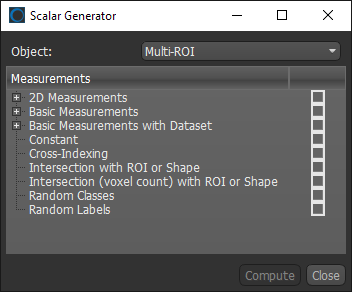
The following categories and items are available in the Scalar Generator for multi-ROIs.
| Description | |
|---|---|
|
2D Measurements |
Lets you compute measurements, such as the area, filled area, perimeter, solidity, and compactness, of the discrete objects, or connected components, within a 2D multi-ROI. Note Refer to the topic 2D Measurements for descriptions of the available measurements. |
|
Basic Measurements |
Lets you compute measurements, such as volumes, surface areas, Phi and Theta angles, aspect ratios, or the centers of mass, of the discrete objects, or connected components, within a multi-ROI. Note Refer to the topic Basic Measurements for descriptions of the available measurements. |
|
Basic Measurements with Dataset |
Lets you compute values, such as minimum, mean, maximum intensity values, weighted centers of mass, and entropy, corresponding to the selected image data and the labeled voxels of the selected multi-ROI. Note Refer to the topic Basic Measurements with Dataset for descriptions of the available measurements. |
|
Constant |
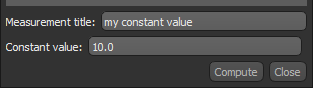
Lets you add a constant value to each class within the selected multi-ROI. You can choose a measurement title and value for the constant, as shown below.
|
| Cross-Indexing |
Lets you cross-index the label number of the selected multi-ROI’s classes to the intersecting classes of another multi-ROI. As shown below, you can choose a measurement title and multi-ROI to cross-index.
As shown in the example below, the Cross-Indexing column shows the intersecting label index of the referenced multi-ROI. You should note that a value of 0 indicates that the label of the selected multi-ROI does not intersect with any labels of the referenced multi-ROI. In addition, in cases in which a label intersects with multiple labels, the first intersecting label will be reported.
|
|
Intersection with ROI or Shape |
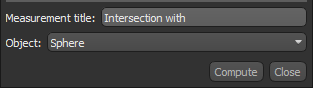
Lets you identify classes that intersect with a region of interest or a shape, such as a box, capsule, cylinder, or sphere. You can enter a title for the measurement and choose the intersecting object, as shown below.
|
|
Intersection (voxel count) with ROI or Shape |
Lets you find compute the number of voxels in classes that intersect with a region of interest or a shape, such as a box, capsule, cylinder, or sphere. You can enter a title for the measurement and choose the intersecting object. |
|
Random Classes |
Adds random classes to the selected multi-ROI. You can enter a title for the values and choose the number of classes, as shown below.
|
|
Random Labels |
Adds random labels to the selected multi-ROI. You can enter a title for the values. |



 2D Measurements
The following measurements are available for 2D (single-slice) multi-ROIs.
| Description | |
|---|---|
|
2D Area |
Is the projected 2D area of the labeled pixels belonging to a discrete object, and is calculated as the sum of the areas of each labeled pixel within the borders of the object. Reported in (default units)2. |
|
2D Bounding Area Box |
Is the area of the bounding box that encloses a discrete object and is reported in (default units)2. |
|
2D Convex Area |
Is the area of the convex hull of a discrete object, which is the smallest convex polygon that can enclose the object. Reported in (default units)2. |
|
2D Eccentricity |
Is the eccentricity of the ellipse that has the same second-moments as a discrete object. Eccentricity is the ratio of the focal distance (distance between focal points) over the major axis length. The value is in the interval [0, 1]. When it is 0, the ellipse becomes a circle. |
|
2D Equivalent Diameter |
The 2D equivalent diameter, or area-equivalent diameter, Is defined as the diameter of a circle with the same area as a discrete object and is computed as sqrt(4*area/pi). Reported in default units. |
|
2D Euler Number |
This simple topological descriptor is computed as the number of components minus the number of holes and is invariant to translation, rotation, and scaling. |
|
2D Extent |
Is the ratio of labeled pixels in an object to pixels in the bounding box. Computed as: 2D Area / 2D Bounding Box Area. |
|
2D Filled Area |
Is the area of all pixels — both labeled and unlabeled — in each discrete object. Reported in (default units)2. |
|
2D Major Axis Length |
Is the length of the primary axis of the best fitting ellipse. Reported in default units. |
|
2D Minor Axis Length |
Is the length of the secondary axis of the best fitting ellipse. Reported in default units. |
|
2D Orientation |
Is the angle between the 0th axis (rows) and the major axis of the ellipse that has the same second moments as an object, ranging from -pi/2 to pi/2 counter-clockwise. Reported in degrees or radians. |
|
2D Perimeter |
Is the length of the outside boundary of the object, which is approximated as a line drawn through the centers of border pixels. Reported in default units. |
|
2D Solidity |
Is the ratio of the pixels in an object to the pixels of the object's convex hull. Solidity is a dimensionless value that measures the density of an object and is computed as: (2D area)/(2D convex area). Note A value of signifies a solid object, while values less than 1 signify objects having irregular boundaries or containing holes. |
|
2D Form Factor |
This dimensionless quantity represents the degree of deviation from an ideal shape, such as a circle or square, and is computed as: 4*pi*area/perimeter2. Note A 2D form factor approaching 1.0 would represent maximum symmetry, such as a circle or square. |
|
2D Roundness |
Is a measure of both the form and roughness of an object and is computed as 4*area/pi*(major axis length)2. Note As an object becomes more round and smooth, roundness would approach 1. Conversely, as an object becomes more elongated and rougher, roundness should approach 0. |
|
2D Compactness |
Is a measure of the compactness of an object and is computed as sqrt((4/pi)*area)/major axis length. Note The compactness of a circle is 1.0, and much less for very elongated objects. |
|
2D Aspect Ratio |
The 2D aspect ratio is computed as: (major axis length)/(minor axis length). Note A perfect square or circle would have an aspect ratio of 1.0 and would approach 0 for a very elongated object. |
|
2D Area/2D Perimeter |
Is the ratio of the 2D area of an object to its 2D perimeter. |
| 2D Max Fereta | Is the longest distance between any two parallel tangents along each distinct object’s convex hull. Can also be referred to as the maximum caliper diameter. |
| 2D Min Fereta | Is the shortest distance between any two parallel tangents along each distinct object’s convex hull. Can also be referred to as the minimum caliper diameter. |
| 2D Feret Anglea | Is the angle (0 to 180 degrees) of the 2D max Feret. |
a Ferets are computed from the center of the voxels that comprise the generated convex hull of each labeled object.
Basic Measurements
The following measurements are available for 3D multi-ROIs.
| Description | |
|---|---|
|
Voxel Count |
Is the total number of labeled voxels in each discrete object. |
|
Volume |
Is the volume occupied by the labeled voxels of each discrete object. Reported in (default units)3. |
|
Surface Area (voxel-wise)a |
Is the surface area occupied by the labeled voxels of each discrete object. Reported in (default units)2. Note This method may perform poorly when evaluating curved and irregular discrete objects. In this case, the Surface Area (interpolated) method may provide a more accurate result. |
|
Volume/Surface Area (Lindblad 2005)b |
Is the calculated volume-to-surface area ratio. |
|
Surface Area X/2, Y/2, Z/2 |
Is calculated as half of the area of the part of the surface that lies on the X, Y, or Z axis. Reported in (default units)2. |
|
Surface Area X, Y, Z |
Is the area of the part of the surface that lies on the X, Y, or Z axis. Reported in (default units)2. |
|
Phi |
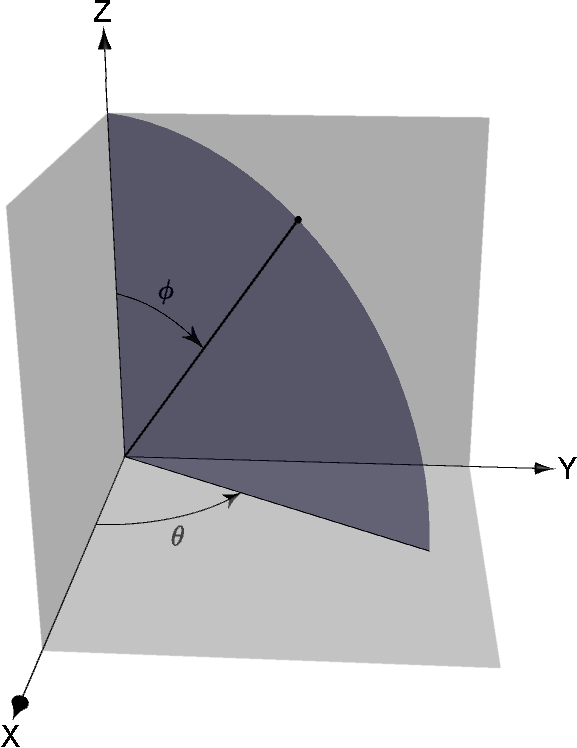
Computed in the world coordinate system, Phi and Theta describe the orientation of the longest axis (shortest eigenvalue of the tensor of inertia) of each discrete object. Reported in degrees or radians. The value of Theta (q), which can range from -180 to 180 degrees, is the angle between the X axis and the projection of the longest axis of the object on the X-Y plane. The value of Phi (f), which can range from 0 to 90 degrees, is the angle between the Z axis and the longest axis of the object. Theta (q) and Phi (f) angles
|
|
Aspect Ratio |
Describes the proportional relationship between the smallest eigenvalue and the largest for the inertia eigenvectors. The aspect ratio is computed as the ratio of the min(eigenvalue1, eigenvalue2, eigenvalue3)/max(eigenvalue1, eigenvalue2, eigenvalue3). Note A perfect cube or sphere would have an aspect ratio of 1.0, while a square or circle would have an aspect ratio of 0.5. The aspect ratio of a perfect rod of one voxel wide or a point is 0.0. |
|
Center of Mass X, Y, Zd, e, f |
Indicates the X, Y, or Z-coordinate of the center of mass, which is calculated from the centroid of the object. |
|
Min Location X, Y, Zf |
Indicates the minimum X, Y, or Z-coordinate of the object and is exported in (default units)2. |
|
Max Location X, Y, Zf |
Indicates the maximum X, Y, or Z-coordinate of the object and is exported in (default units)2. |
|
Min Feret Diameter |
Is the shortest distance between any two parallel tangents along each discrete object’s convex hull. Can also be referred to as the maximum caliper diameter. Reported in (default units). |
|
Mean Feret Diameter |
Is the mean value of the minimum and maximum Feret diameters of each discrete object's boundary over a sufficient number of orientations. Reported in (default units). |
|
Max Feret Diameter |
Is the longest distance between any two parallel tangents along each discrete object’s convex hull. Can also be referred to as the maximum caliper diameter. Reported in (default units). |
|
Min Ortho Feret Diameter |
Is the shortest distance between any two points along each discrete object's boundary that are orthogonal to the maximum Feret diameter. Reported in (default units). |
|
Min Ortho/Max Feret Diameter |
Is the ratio of the minimum orthogonal Feret diameter to the maximum Feret diameter. NoteThis measure can provide a good indication of the elongation of a particle. |
|
Convex Hull Surface Area (voxel-wise)a |
Is the surface area of the convex hull of each discrete object. |
|
3D Solidity (voxel-wise)a |
Is the ratio of the surface area to the convex hull surface area. A value of 1 signifies a perfectly smooth and solid distinct object, while a value less than or greater then 1 signifies an object having an irregular boundary or that contains holes. |
|
Total Roughness Proxy XY (Heenan 2020)g |
Total Roughness Proxy XY/YZ/XZ… Are proxy measurements that report the roughness of particles, which are pre-supposed to be approximately spherical. A marching cubes mesh of the particle is computed and then resampled along the particle’s median plane in XY, YZ, or XZ. In that plane, the maximum and minimum radius of the resampled surface contour is computed from the object’s centroid. The Total Roughness Proxy is the difference of the maximum and minimum radius, as shown below.
Total Roughness Proxy XYZ… Reports the difference of the minimum radius observed over all three planes from the maximum observed over all three planes. Note This measurement is based on the method proposed by Thomas Heenang and should be considered as only a proxy for roughness. In addition, metrics such as this can possess fractal properties and are dependent up upon characterization resolution both in terms of voxel or spatial resolution and the angular increment. |
|
Total Roughness: Particle Radius Range
|
Are measurements that report the roughness of particles, which are pre-supposed to be approximately spherical. A marching cubes mesh of the particle is computed, and then the radius is evaluated for all positions on the surface of that mesh from the object’s centroid. Total Roughness: Particle Radius Range… Reports the difference between the maximum radius (not constrained to any planes) and the minimum radius. Total Roughness: Particle Radius Standard Deviation… Reports the standard deviation of all radii evaluated. |
|
Particle Radius Min
|
Are measurements that report the radius of particles. A marching cubes mesh of the particle is computed, and then the radius is evaluated for all positions on the surface of that mesh from the object’s centroid. Particle Radius Min… Reports the minimum of all evaluated radii. Particle Radius Max… Reports the maximum of all evaluated radii. Particle Radius Mean… Reports the mean of all evaluated radii. |
| Sphericity |
Measures the degree to which an object approaches the shape of a “sphere”, by computing the ratio between object volume and surface area. This ratio is computed as follows:
In the above, Vp is the volume of the particle and Ap is the surface area of the particle. In this case, the surface area is computed using the Lindblad surface area estimator methodc. |
| Distance to Closest Object | Computes the distance between each distinct object and its closest neighbor. |


a In this case, measurements of surface area are computed voxel-wise, i.e. the area of the exposed faces of voxels is summed. This method may perform poorly when evaluating curved and irregular discrete objects. Measurements provided by Surface Area (Lorensen 1987) and Surface Area (Lindblad 2005) may be more accurate.
b In this case, measurements of surface area are computed using the marching cubes algorithm, as described in William E. Lorensen, Harvey E. Cline, Marching Cubes: A High Resolution 3D Surface Construction Algorithm. ACM SIGGRAPH Computer Graphics, 21(4), July 1987, pp 163-169 (DOI:https://doi.org/10.1145/37402.37422).
c In this case, measurements of surface area are computed using the Lindblad surface area estimator, as described in Joakim Lindblad, Surface area estimation of digitized 3D objects using weighted local configurations. Image and Vision Computing, 23, 2005, pp 111-122 (DOI:10.1016/j.imavis.2004.06.012).
d Weighted center of mass measurements are also available when a dataset is selected (see Basic Measurements with Dataset).
e The center of mass may be located outside the physical object, as is the case for hollow or open-shaped objects.
f In Dragonfly, X-Y-Z locations are described in the world coordinate system.
g Thomas Heenan, Alice Llewellyn, Andrew Leach, Matthew Kok, Chun Tan, Rhodri Jervis, Dan Brett, Paul Shearing, Resolving Li-Ion Battery Electrode Particles Using Rapid Lab-Based X-Ray Nano-Computed Tomography for High-Throughput Quantification. Advanced Science, 7(12), June 2020 (DOI:10.1002/advs.202000362).
Basic Measurements with Dataset
Datasets are needed to compute statistical properties such as the minimum and maximum intensity values, entropy, and weighted centers of mass of the discrete objects, or connected components, within a multi-ROI.
In this case, you need to choose the dataset from which the scalar values will be extracted, as shown below. You should note that only datasets with the same shape as the selected multi-ROI will be available in the drop-down menu.

| Description | |
|---|---|
|
Entropy |
Is a histogram-based descriptor that is a measure of information content based on the local histogram shape. In image processing entropy might be used to classify textures, a certain texture might have a certain entropy as certain patterns repeat themselves in approximately certain ways. A component with low entropy is more homogenous than a component with high entropy. Likewise, a vector with relatively "low" entropy is a vector with relatively low information content. A vector with relatively "high" entropy is a vector with relatively high information content. Note Refer to https://en.wikipedia.org/wiki/Entropy_(information_theory) for more information about entropy. |
|
Min Intensity |
Indicates the minimum voxel value found for each discrete object in the multi-ROI. |
|
Max Intensity |
Indicates the maximum voxel value found for each discrete object in the multi-ROI. |
|
Mean Intensity |
Indicates the mean value of all voxels found for each discrete object in the multi-ROI. |
|
Variance Intensity |
Indicates the variance of all voxel values found for each discrete object in the multi-ROI. |
|
Std Dev Intensity |
Indicates the standard deviation of all voxel values found for each discrete object in the multi-ROI. |
|
Weighted Center of Mass Xa |
Indicates the X-coordinate of the weighted center of mass. |
|
Weighted Center of Mass Ya |
Indicates the Y-coordinate of the weighted center of mass. |
|
Weighted Center of Mass Za |
Indicates the Z-coordinate of the weighted center of mass. |
a The center of mass of a distribution of mass in space is the unique point where the weighted relative position of the distributed mass sums to zero. If the object has uniform density, it will be located at the centroid. If not, the weighted position coordinates of the distributed mass defines its coordinates. X-Y-Z locations are described in the world coordinate system.
How to Generate Scalar Values for Multi-ROIs
- Right-click the multi-ROI to which you want to add scalar values and then choose Scalar Generator in the pop-up menu.
The Scalar Generator dialog appears.
- Select the measurements and other values that you want to add to the selected multi-ROI, as well as any other requirement(s).
- Click Compute.
The computed measurements and other values are selectable in the Scalar information box and the values for each class can be viewed in the Classes and scalar information box, as shown below.


